Knowledge Graph - Normalize Entry Guide
1 Introduction
The IMO® Precision Normalize API can be leveraged as a useful companion tool for obtaining entry points into the Knowledge Graph. Using IMO Precision Normalize, you can map a medical term or industry standard clincial code from a source document to an IMO lexical code. This lexical code can then be used as the starting point for a Knowledge Graph query, enabling you to connect raw input from a clinical setting to a graph-based representation of standardized clinical concepts and relationships.
The current document provides supporting guidance for this workflow, discussing how to prepare your source data, select the appropriate domain, interpret the Normalize response, and validate results before downstream use. This document assumes some basic familiarity with the IMO Precision Normalize API. For full details on any of the normalization fields and features described below, please refer to the IMO Precision Normalize API documentation in the API Catalog.
1.1 How the Entry Point Affects Results
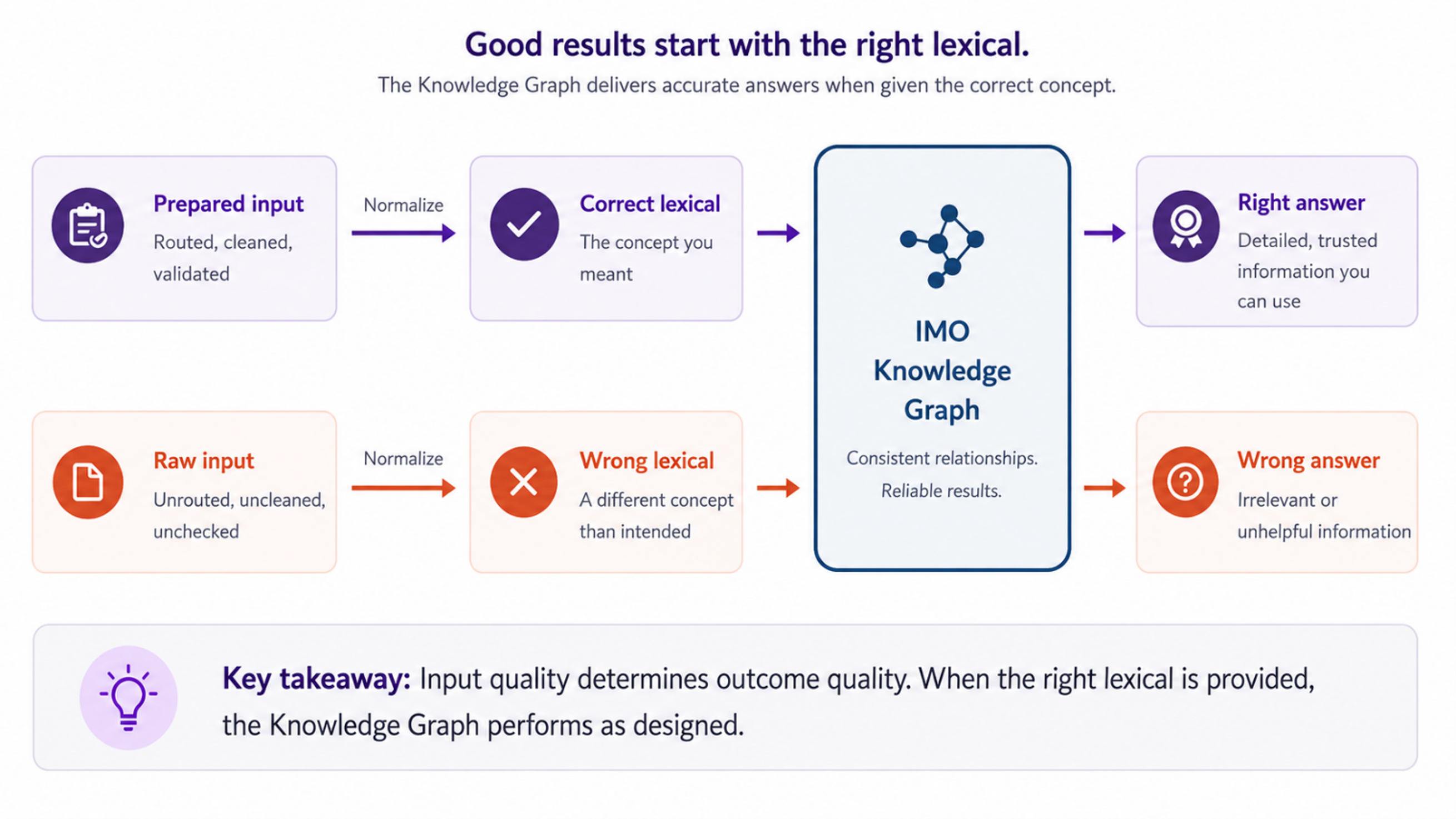
The Knowledge Graph answers questions about one concept at a time: the concept you send it. When that concept is correct, the relationships and codes it returns describe the condition you intended. When the concept is wrong, the graph still returns a well-formed response, but the clinical content describes something else.
The graph has no way to detect this. A query built on the wrong concept is still a valid query, so no error is raised and nothing downstream flags a problem. For that reason, the accuracy of your normalization results largely determines the accuracy of anything you build on top of the graph.
2 Choosing a Domain
2.1 Available Domains in Normalize
IMO Precision Normalize organizes lexicals into five domains. Each domain has its own hierarchy, relationship types, and external code mappings.
| DOMAIN | CONTENT | PRIMARY CODE SYSTEMS |
|---|---|---|
| Problem | Diagnoses, conditions, symptoms, and findings | ICD-10-CM, SNOMED CT |
| Medication | Drugs, biologics, supplements, and vaccines | RxNorm, NDC |
| Procedure | Surgical, diagnostic, and therapeutic procedures | CPT, SNOMED CT, LOINC |
| Lab | Laboratory tests and panels | LOINC |
| Allergen | Allergens and environmental triggers | SNOMED CT, UNII |
By comparision, the Knowledge Graph organizes lexicals using only the Problem, Medication, and Procedure domains. Lexicals considered to belong to the "Lab" domain in Normalize are grouped into the Procedure domain in the Knowledge Graph. Similarly, "Allergen" domain lexicals in Normalize are grouped into the Medication domain in Knowledge Graph.
2.2 How Domain Selection Affects Matching
In an IMO Precision Normalize API request, when you submit an input term with a specified domain (e.g. "problem"), the API looks for the closest matching lexical in that one domain. When you submit an input term with a domain of "auto", the API looks for the closest matching lexical in any domain available to Normalize.
In a real world scenario, a batch of records that you intend to send to the IMO Precision Normalize API may include a mix of terms applicable to several different domains. For example, you may have a data set that is primarily composed of lab orders, but also includes imaging, supply items, and administrative records. If your normalize requests for this data all supply a domain of "lab", then many of those terms will either fail to match, or they will match to a Lab domain lexical that is contextually unrelated to the original term. In reporting, this situation may appear as a low match rate, when in fact it was the result of improper domain routing.
To prevent this siuation from occurring, your normalize requests can either specify a domain of "auto", or you can attempt to pre-filter your records by domain before submission. The "auto" domain resolution option is useful in situations where domain sorting is impractical, but this approach has higher latency and in certain edge cases can still result in a term being matched to a lexical from the wrong domain. When possible, pre-filtering your records and submitting each term with a specified domain is ideal and can be accomplished with minimal effort if your source system tracks an order type or similar indicator.
2.3 Querying Lab Concepts in the Graph
In IMO Precision Normalize, lab tests are matched to lexicals in the "Lab" domain, but in the Knowledge Graph they are modeled as diagnostic procedures. A lab-domain lexical returned by Normalize is therefore queried in the Knowledge Graph with domain: procedure.
Similarly, in IMO Precision Normalize, allergenic agents are matched to lexicals in the "Allergen" domain, but in Knowledge Graph they are modeled as medication substances. An allergen-domain lexical returned by Normalize is therefore queried in the Knowledge Graph with domain: medication.
Passing a returned 'lab' or 'allergen' domain value from a Normalize result into a Knowledge Graph query is a common reason for receiving an empty response.
3 Preparing Input Data
Preprocessing is worth building into your workflow as a regular process rather than handling it as occasional cleanup. Below are some recommended adjustments that you can apply consistently across batches to ensure the best match quality:
3.1 Prepare Source Terms
3.1.1 Expand Clinical Abbreviations
Abbreviations were the most frequent cause of reduced match scores in Normalize operations for the EHR-sourced datasets IMO reviewed. Expanding abbreviations to their full clinical term can often improve match confidence or even result in confident matches where an abbreviation would have found no match at all.
Review your source data to identify frequently occurring abbreviations and develop dataset-specific mappings to their full clinical terms. Apply these expansions during preprocessing, before submitting terms to Normalize. Only expand abbreviations when their meaning is clear from the clinical context, as some abbreviations may have multiple meanings.
The following table provides examples of common clinical abbreviations and their recommended expansions. These examples are illustrative and not intended as an exhaustive list.
| ABBREVIATION | EXPAND TO |
|---|---|
| EKG / ECG | electrocardiogram |
| CTA Chest | CT angiography chest |
| TAVR | transcatheter aortic valve replacement |
| MenACWY | meningococcal ACWY vaccine |
| PrEP | pre-exposure prophylaxis |
| LAD | left anterior descending coronary artery |
| Fx / Hx / Fhx | fracture / history of / family history of |
| DM | diabetes mellitus |
3.1.2 Remove Facility-Specific Prefixes
EHR-sourced data may contain facility codes, institution prefixes, historical markers, or other identifiers that are not part of the clinical term itself. In Normalize operations, these additional characters can reduce match confidence, cause incorrect matches, or prevent otherwise valid terms from matching.
Review source data to identify recurring nonclinical prefixes and identifiers and remove them during preprocessing before submitting terms to Normalize. Ensure that your transformations preserve the underlying clinical meaning, as some prefixes or abbreviations may be clinically relevant.
The following table provides examples of some common types of prefixes that have been known to cause matching issues:
| PATTERN | EXAMPLE | EFFECT ON MATCHING |
|---|---|---|
| Historic-result markers | HX (before a result name) | Suppresses a match on an otherwise valid term |
| Site and facility codes | AH, LC, SEH, POC | May match as chemical names |
| Institution prefixes | BSWH ENT, {NYP}, UPHS CV | Reduces the match score |
| Classification codes | m3, f3, t22 (in allergen terms) | Obscures the allergen being described |
3.1.3 Use the Clinician-Facing Name
Where a source system holds both a clinician-facing and a patient-facing name for the same concept, submit the clinician-facing name in Normalize requests. Patient-facing names are written for readability, which tends to remove details that the API relies on.
3.2 Choose a Match Strategy
A record can carry a term, a code, or both. The match_field_pref preference tells Normalize which field to try first, and whether to fall back to the other.
| VALUE | BEHAVIOR | WHEN TO USE IT |
|---|---|---|
input_term_first |
Matches on the term. If the score falls below the threshold, it then tries the code. | The default, and a reasonable choice for mixed data. |
input_code_first |
Matches on the code. If the code is not found, it then tries the term. | Your codes have been validated and are reliable. |
input_term |
Matches on the term only. | No codes are present, or the source coding is known to be unreliable. |
input_code |
Matches on the code only. | You are resolving codes to concepts and have no text to fall back on. |
Free-text terms can be normalized without a source code. Where a validated code from a recognized clinical terminology or code system is available, providing it can improve matching consistency by offering a standardized reference to the intended clinical concept and reducing ambiguity associated with free-text descriptions.
However, source codes may be outdated, overly broad, or may not fully represent the clinical meaning captured in the term. Review code accuracy, specificity, and alignment with the source term before prioritizing coded input. When a code is unreliable or does not adequately represent the intended clinical concept, normalizing on the source term may produce more appropriate results.
3.3 Validate your Code Format
Codes that pass through an ETL layer are corrupted more often than teams expect and a malformed code submitted in a Normalize request will simply fail to match rather than return an error. Because of this, formatting problems are easy to mistake for gaps in IMO's content. Validating your format before submission avoids that.
The following table provides examples of some common formatting issues that have been known to cause matching issues:
| PROBLEM | WHAT IT LOOKS LIKE | HOW TO HANDLE IT |
|---|---|---|
| Column misalignment | A timedelta string where a code belongs | Correct the mapping in the ETL layer |
| Missing separator | 61921 rather than 6192-1 | Reinsert the separator |
| Non-standard separator | Colon-separated internal variants | Convert to the standard format |
| Sentinel values | *Unspecified in the code field |
Replace with null so that term matching runs cleanly |
3.4 Filter Content That Will Not Match
Some records submitted in a Normalize request fail to find a match because they do not describe clinical concepts. Filtering out these irrelevant terms before submission reduces API usage and makes it easier to investigate the remaining terms that fail to match, which are much more like to represent a real content issue.
The following are some example of erroneous terms commonly submitted in Normalize operations:
-
Device sizes, material specifications, and surgical approach descriptors. These are legitimate clinical data, but they belong in a device registry rather than a terminology system.
-
Anatomical modifiers with no associated condition.
-
Administrative and telemetry records, reagent lots, and pathology document titles.
4 Reading the Response
4.1 Understanding the Confidence Score
A Normalize confidence score indicates how strongly the submitted input matches a returned lexical within the specified domain. Higher scores generally indicate stronger matches, allowing organizations to establish thresholds for automatically accepting normalization results.
Review a representative sample of results to validate appropriate confidence thresholds for your dataset and use case. Once established, these thresholds can support automated processing at scale, with clinical review focused on lower-confidence matches, unmatched terms, and recurring patterns that may require further investigation.
Confidence scores alone may not guarantee that a result is clinically appropriate. Before using a normalize result for a Knowledge Graph query, you may want to apply the checks described in Section 5.
4.2 Handling Discrepancy Flags
When a Normalize request enables discrepancy checking and the response includes discrepancy.found = true, this indicates that the code supplied alongside the input term differs from the code recommended by IMO for the matched lexical.
The discrepancy check flag is sometimes filtered out as technical noise, but it can often identify incorrectly assigned codes in the source system. Reviewing them can surface coding errors that may have been affecting downstream analytics.
The following table provides some examples of situations that the discrepancy check flag can help identify:
| PATTERN | WHAT IT USUALLY INDICATES | HOW TO HANDLE IT |
|---|---|---|
| High score with a discrepancy flag | The term matched correctly and the source code is wrong. | Add the record to a reconciliation list for the source system. |
| Discrepancy flag on a corrupted code | An input quality problem rather than a coding error. | Correct the code format during preprocessing. |
| Discrepancy flag with no clear cause | A possible difference in clinical meaning. | Route to clinical review or raise it with IMO. |
4.3 Handling Response Format Differences
The structure of the mappings object in Normalize responses has changed between specification versions. Earlier versions returned a flat array and current versions return an object keyed by code system. Checking the type before parsing allows the same code to handle both.
It is also worth confirming behavior against the environment you will run in rather than against the specification alone, because documented versions and deployed versions can differ. In one case, a previously documented match_field_pref value was rejected in production after the allowed values had changed. Recording the version you tested against makes this easier to diagnose later.
5 Checks to Run Before Calling the Graph
Before submitting a lexical code returned in a Normalize response to the Knowledge Graph, IMO recommends that you perform the following checks. Each of these checks identifies an issue that the confidence score alone may not reveal.
5.1 Check the Match Against the Input Domain
When using "auto" domain resolution, compare the domain of the matched lexical with the context of the input text. A small set of rules will frequently identify most cross-domain matches.
In general, you should flag a result for review in the following cases:
-
The input text contains imaging language such as scan, CT, MRI, echo, or nuclear, and the matched lexical is from the Lab domain.
-
The input text contains supply or dosing language such as syringe, dose, refill, or mg, and the matched lexical is from the Lab domain.
-
The input text names an anatomical site that the matched lexical does not include.
5.2 Maintain Stored Normalization Results
Clinical terminologies evolve over time as concepts and codes are added, revised, or deprecated. Organizations that store or cache Normalize results for downstream use should establish a process to keep these mappings current as terminology content changes.
Periodically review stored mappings against updated terminology content and reprocess affected records through Normalize when appropriate. This helps ensure downstream systems always use the latest, clinically appropriate concepts without relying on outdated mappings or static code substitutions.
5.3 Set a Confidence Threshold
Performing Knowledge Graph traversal on a lexical that was matched with low confidence may provide you with detailed information about the wrong concept. Before using a returned lexical code in a Knowledge Graph query, you may want to compare the returned score against a confidence threshold.
IMO recommends using the following match confidence thresholds:
| SCORE | SUGGESTED HANDLING |
|---|---|
| 0.85 and above | Use the result. Knowledge Graph traversal is appropriate at this level. |
| 0.60 to below 0.85 | Compare against an alternative resolution before using the result. |
| Below 0.60 | Consider graph-consensus disambiguation, which confirms a concept by checking whether several traversal paths agree. |
| No match | Route to manual review. |
5.4 Always Use 'default_lexical_code'
The Normalize API returns both a lexical_code and a default_lexical_code for for each matched lexical. As a best practice, use 'default_lexical_code' for Knowledge Graph queries. In some cases, the 'lexical_code' might reference an alias that the Knowledge Graph does not recognize.
6 Reference
6.1 Preflight Checklist
| # | CHECK |
|---|---|
| 1 | Domain routing defined for the input dataset. |
| 2 | Abbreviation expansion table built for the source vocabulary. |
| 3 | Facility-prefix removal rules defined. |
| 4 | Code format validation in place. |
| 5 | Filter in place for content that fails to match. |
| 6 | Domain check implemented for match results. |
| 7 | Stored normalization results maintenance routine implemented. |
| 8 | Discrepancy flag handling defined. |
| 9 | Confidence threshold set for Knowledge Graph traversal. |
| 10 | Lab-to-procedure domain translation implemented. |
| 11 | Allergen-to-medication domain translation implemented. |
| 12 | Response caching configured to suit the vocabulary refresh cadence. |
6.2 Investigating a Low Match Rate
A single aggregate Normalize match rate is difficult to act on. Separating the no-match population by cause will usually expose several unrelated issues, with each having a different remedy.
The following table describes several common causes of match failure:
| CAUSE | HOW TO IDENTIFY IT | HOW TO ADDRESS IT |
|---|---|---|
| Records routed to the wrong domain | Sample the no-matches and classify them by their actual domain. | Route by domain before submission, or use "Auto" for mixed input. |
| Corrupted codes | Validate code format across the batch. | Correct the mapping in the ETL layer and replace sentinel values. |
| Unexpanded abbreviations | Look for short all-caps tokens among the low-scoring records. | Build an abbreviation expansion table. |
| Facility prefixes | Look for the same leading token repeating across many records. | Remove the prefixes before submission. |
| Content that will not match | Check for device sizes, materials, and administrative records. | Filter these records and report them separately. |
| Patient-facing names | Compare against the clinician-facing field where one exists. | Submit the clinician-facing name instead. |
To make it easier to identify underlying patterns, it is also a best practice to track match rates separately for coded and term-only records, and for each domain. Blended reporting figures tend to hide underlying causes and make it more difficult to track improvement.
© 2026. IMO Health is a trademark of Intelligent Medical Objects, Inc. All rights reserved