IMO® Precision Normalize - On-Premises Deployment Guide
1 Introduction
This guide provides authorized IMO Health customers with the information needed to configure and deploy an instance of the IMO® Precision Normalization API in an on-premises environment.
This guide consists of the following major sections:
-
1 Introduction
Introduces the on-premises deployment of the IMO Precision Normalize API, including its functionality, architecture, and deployment prerequites.
-
2 Configure Kubernetes Cluster Resources
Provides guidance on resource distribution for a Kubernetes cluster hosting an on-premises deployment of the IMO Precision Normalize API.
-
Describes how to configure the Kubernetes manifest files used during container deployment.
-
Walks you through deploying the IMO Normalize Precision API on-premises application containers.
-
5 Normalize and Content Version Compatiblity
IMO content domain versions compatibile with the on-premises deployment of the IMO Precision Normalize API.
1.1 On-Premises Normalization Functionality
The on-premises deployment of the IMO Precision Normalize API provides access to most of the same functionality as the Classic implementation of the IMO hosted version of the API, as documented on the REFERENCE DOCUMENTATION and CLASSIC GUIDE tabs. However, the on-premises version includes the following differences from the IMO hosted version:
-
Supported Operations: The on-premises version of the API only supports the following operation:
POST /precision/normalize/v1
-
Authentication: The on-premises version of the API does not perform authentication. Requests are accepted regardless of whether an Authorization header is included and any supplied Authorization header is ignored.
-
Unsupported Normalization Features: When performing normalization requests, the following features are not supported in the on-premises version of the API:
-
Semantic Matching: On-premises normalization operations always behave as if the
preferences.use_semantic_matchfield is set to "false". If included in a request payload, this preference is ignored. -
Domain Relevance Filter: On-premises normalization operations always behave as if the
preferences.use_domain_relevance_filteris set to "false". If included in a request payload, this preference is ignored. -
AI Enhancement: The AI Enhancement feature is always disabled for normalization operations.
-
SFTP: The on-premises version of the API does not include an SFTP interface.
-
1.2 Architecture
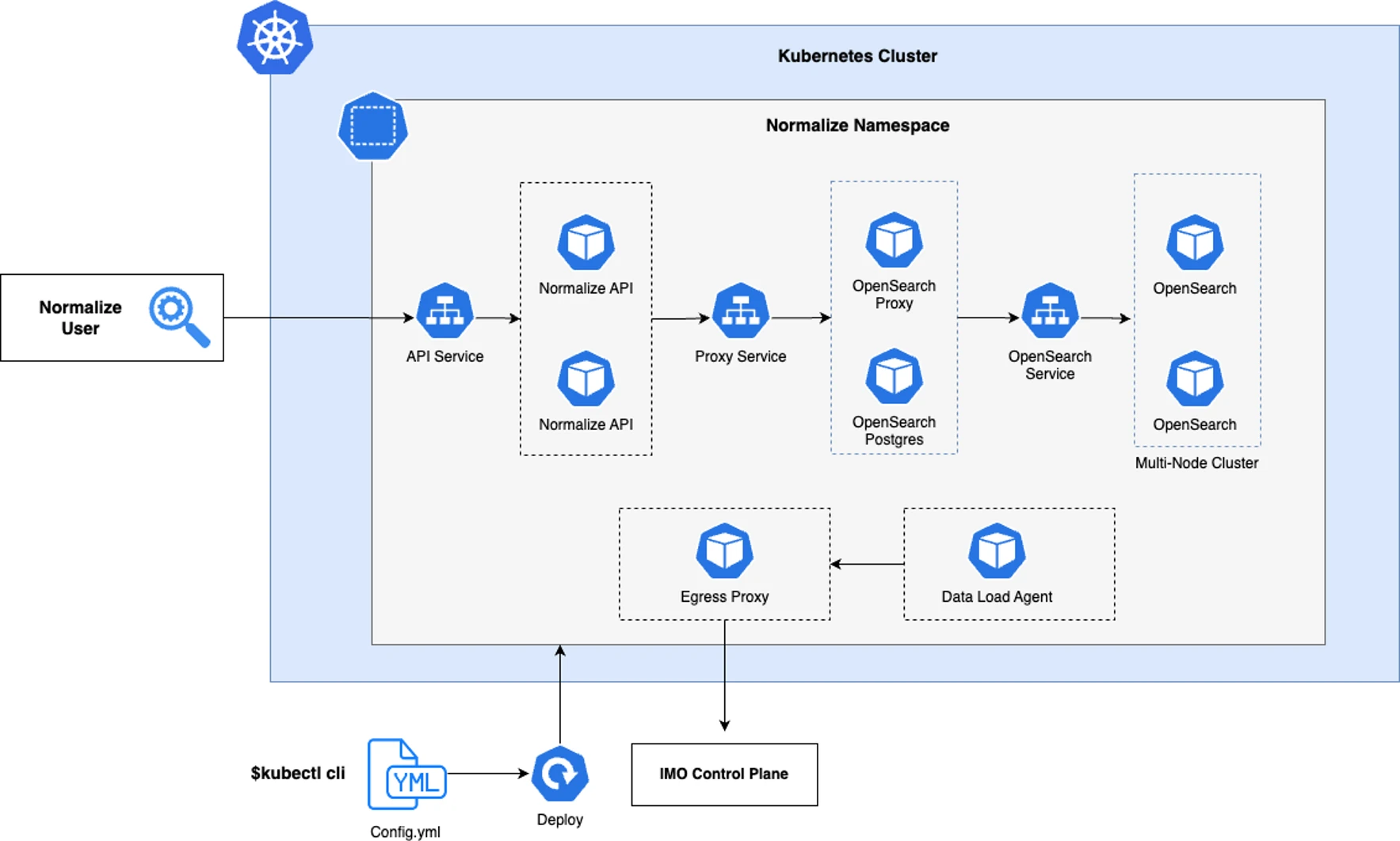
In an on-premises environment, the IMO Precision Normalization API runs in a Kubernetes cluster in the following application containers. This guide will walk you through the process of configuring and deploying each of these containers:
-
Normalize-API: The REST API layer for the Normalize service.
-
OpenSearch: The backend search engine for the Normalize service.
-
OpenSearch Proxy: The proxy service used to secure data access to OpenSearch. This component is sometimes also referred to as the "Encryption Service".
-
OpenSearch Postgres: The database used to store metadata for the OpenSearch proxy service
Note: If you prefer, you may choose to use a managed database service from your cloud provider in place of running this component on your Kubernetes cluster.
-
Data Load Agent: This agent performs content updates periodically for the Normalize service. This component is sometimes also referred to as the "Content Service".
-
Egress-Proxy: The egress proxy is responsible for sending egress calls to the IMO control plane. The egress proxy has the following responsibilities:
- Dispatching usage telemetry data from the on-premises data plane to the IMO control plane.
- Retrieving encryption metadata from the IMO control plane for decrypting the encrypted data at rest.
- Allowing the Data Load Agent (DLA) service to retrieve content from the IMO Control Plane.
Note: The Egress Proxy is a shared component across multiple IMO products. If multiple IMO products are installed in the same cluster, only one Egress Proxy is required.
1.3 Security
The customer is responsible for controlling applications and users that interact with their deployment. There are no access restrictions built into the container images.
By default, the application containers are configured with insecure communication protocols, but you have the option of securing network communications using Transport Layer Security (TLS). If you wish to use TLS, you will need to source a valid certificate and private key. In section 3 Configure Manifests below, you will be instructed to supply the path to any applicable TLS certificate and private key files when configuring the Normalize and Egress Proxy configmap.yaml manifest files.
1.4 Tools and Prerequisites
In order to deploy the IMO Precision Normalize API on-premises, you must meet the following prerequisites:
-
Container Management Tool: You will need a container management tool, such as Docker or Podman. The examples in this guide assume that you are using Docker.
-
Private Container Repository: You will need a private container repository accessible by your Kubernetes cluster. This repository will be used to host the API's container images.
Private container registry services include AWS ECR (Elastic Container Registry), Azure Container Registry, and Google Container Registry. Please consult with your Security and Operations teams to determine the most appropriate option for your environment.
-
Kubernetes: You will need to set up a Kubernetes cluster to host and manage the API containers. You may use an alternate container orchesestration service if you prefer, but Kubernetes is recommended as the most mature and popular service for managing containers.
See 2 Configure Kubernetes Cluster Resources for details on resource distribution.
-
API Credentials: As part of your onboarding, IMO Health Customer Support will provide you with an Organization ID, a Client ID, and a Secret, which you will need to supply when configuring the Kubernetes manifest files.
Unlike the IMO hosted version of the API, these credentials are not supplied in the authorization header of normalization requests. The on-premises version of the API does not perform authentication.
-
TLS Certificate (optional): If you wish to use Transport Layer Security (TLS) to secure network communications, you will need to source a valid certificate and private key. If applicable, you will supply the path to your certificate and private key files when configuring the Normalize and Egress Proxy configmap.yaml manifest files in section 3 Configure Manifests below.
-
ShareFile Site Artifacts: You will need to download several artifacts from the following ShareFile site. As part of your onboarding, IMO Health Customer Support will provide you with login credentials for this site:
This site includes the following artifacts you will need to complete the tasks in this guide:
-
Container images: Each of the application container images described in 1.2 Architecture above. You must host these images in your Private Container Repository. For guidance, see 1.4.1 Host Images below.
-
license.yaml: A license file for your on-premises deployment. You will need to supply the path to this file when configuring the Kubernetes manifest files.
-
mtls.yaml: A configuration manifest used to enable Mutual Transport Layer Security (MTLS) for your on-premises deployment. You will need to mount this file in your Kubernetes installation.
-
Kubernetes manifests: Several Kubernetes manifest files that you will configure as part of the steps in this guide.
-
Validation scripts: A Postman collection containing several requests you can use to validate that the normalization service is operational after completing the steps in this guide.
-
1.4.1 Host Container Images
You must host the application container images that you downloaded from the IMO ShareFile site in your private container repository. Once hosted, these images must be accessible to your Kubernetes cluster.
If using Docker as your container management tool, this can be accomplished with the following commands. Replace the bracketed placeholder values as appropriate for your environment:
docker load -i <container_image.tar>
docker tag <IMO_REPO:imo_image_tag> <CUSTOMER_REPO:customer_image_tag>
docker image push <CUSTOMER_REPO:customer_image_tag>
2 Configure Kubernetes Cluster Resources
The following sections provide guidance on resource distribution for a Kubernetes cluster hosting an on-premises installation of the IMO Precision Normalize API:
2.1 Standard Resource Distribution
The following table outlines the standard recommended distribution of resources for your Kubernetes cluster. This configuration requires a total of 41 vCPU and 64 GB of RAM. This is approximately 6 general purpose instances that provide 8 vCPU and 16 GB of RAM per host. Your actual configuration may vary based on such factors as instance type and whether you run IMO services on dedicated hosts or commingle them with other services on your Kubernetes cluster:
| Component | Resources per Replica | Replicas |
|---|---|---|
| Normalize-API | 2 vCPU, 4 GB RAM | 3 |
| OpenSearch | 8 vCPU, 16 GB RAM | 3 |
| Data Load Agent | 1 vCPU, 2 GB RAM | 1 |
| Egress Proxy | 0.5 vCPU, NA | 2 |
| OpenSearch Proxy | 4 vCPU, 2 GB RAM | 2 |
| OpenSearch Postgres | 0.5 vCPU, NA | 2 |
System performance and throughput depends on the complexity of normalization. Code-based normalization achieves the highest throughput, while term-based normalization in the Problem domain yields slightly lower normalization throughput compared with other domains. Medication domain term normalization currently yields the lowest throughput.
The following table summarizes monthly steady-state throughput for common normalization scenarios using the recommended configuration of 3 OpenSearch replicas:
| Scenarios | Domain | Terms per Minute | Terms per Month |
|---|---|---|---|
| Code | Any | 200K | 10 MM |
| Term | Problem | 75K | 4 MM |
| Term | Lab | 35K | 1.5 MM |
| Term | Medication | 6K | 275K |
| Term | Mixed (even distribution of Problem, Procedure, Lab, Medication) |
16K | 700K |
2.2 Scaling
Capacity for the OpenSearch component is the primary constraint on overall throughput. Horizontally scaling the OpenSearch component by 2X yields ~2X improvement in overall throughput. Additional factors such as the number of unique entities and whether the upstream service caches the results for a resolved entity may also affect your desired throughput. Depending on your use case and computational needs, you may also want to increase vCPU and RAM limits or add persistent volumes for indefinite data storage.
The Normalize-API component acts as a secondary constraint on overall throughput. We recommend horizontally scaling this component once CPU utilization reaches 60%.
The following table provides examples for how adding additional OpenSearch Replicas can alter throughput. The figures in this table are based on a sample dataset with a distribution of terms across the Problem, Lab, and Medication domains. This dataset is based on real world scenarios involving a range of entities that would commonly be extracted from clinical notes by an NLP service. Throughput for a dataset with a higher incidence of Problem entities would likely be higher than these figures, while throughput for a dataset with a higher incidence of Medication entities would likely be lower.
| OpenSearch Replicas | Terms per Minute | Terms per Month | Terms per Year |
|---|---|---|---|
| 3 | 16K | 700K | 8.4 B |
| 5 | 26K | 1.4 MM | 14 B |
| 10 | 53K | 2.3 B | 28 B |
3 Configure Manifests
The following sections will guide you through configuring the manifest files that you downloaded from the IMO ShareFile site. These sections will make reference to REQUIRED properties, which must be defined with a valid value, and OPTIONAL properties which may be excluded from the manifest file. For optional properties, you may need to manually add the applicable keys and properties to the manifest file, if excluded.
Configure the following manifest files that you downloaded from the IMO ShareFile site:
- 3.1 Bracketed Environment Properties
- 3.2 Normalize Manifest Configuration
- 3.3 Data Load Manifest Configuration
- 3.4 Egress Proxy Manifest Configuration
3.1 Bracketed Environment Properties
The following manifest files include bracketed property value placeholders (e.g. image: <normalize-container-image>) which you must replace with values appropriate to your environment. These include references to the container images that you hosted in your private container repository.
- manifests/data-load-agent/application.yaml
- manifests/egress_proxy/application.yaml
- manifests/normalize/application.yaml
- manifests/opensearch/engine/application.yaml
- manifests/opensearch/proxy/application.yaml
3.2 Normalize Manifest Configuration
The following manifest file is used to configure the Normalize-API application container. The Normalize application components are responsible for performing code and term-based normalization and resolving them to one or more standard coding systems like ICD-10-CM, LOINC, and SNOMED CT:
/manifests/normalize/configmap.yaml
The following table lists each of the properties that you can configure in this manifest file, broken down into sections by key.
| Property | Description |
|---|---|
app (REQUIRED) |
|
| port | Integer. The port on which the backend service runs. Defaults to 8080. |
| license | String. The relative path to the license.yaml file you downloaded from the IMO ShareFile site. |
| validationSchema |
String. The relative path to a schema file used to validate incoming requests. This file will be added during container deployment. In most situations, you should accept the default value for this property. |
| medicationParserEndpoint |
String. The HTTP endpoint for the sidecar used for medication matches. In most situations, you should accept the default value for this property. |
| tlsConfig.enabled | Boolean. Indicates whether Transport Layer Security (TLS) is enabled. You should only enable this if you opted to secure network communications via TLS and you have obtained a valid certificate and private key. |
| tlsConfig.certPath | String. If tlsConfig.enabled is "true", this is the relative path to your TLS certificate. |
| tlsConfig.keyPath | String. If tlsConfig.enabled is "true", this is the relative path to your TLS certificate key. |
search (REQUIRED) |
|
| Protocol | String. The protocol to use for the search service. Only https is accepted. |
| host |
String. The host for the search service. In most situations, you should accept the default value for this property. |
| port | Integer. The port for the search service. |
| auth.username |
String. The username used for search service authorization. In most situations, you should accept the default value for this property. |
| auth.password |
String. The password used for search service authorization. In most situations, you should accept the default value for this property. |
| mtls.enabled |
Boolean. Indicates whether MTLS should be enabled. Only true is accepted. The mtls properties reference values from the mtls.yaml file that you downloaded from the IMO ShareFile site and mounted in your Kubernetes installation. In most situations, you should accept the default values for these properties. |
| mtls.caPath | String. The relative path to the root certificate used for MTLS authorization. |
| mtls.certPath | String. The relative path to the certificate used for MTLS authorization. |
| mtls.keyPath | String. The relative path to the encrypted key used for MTLS authorization. |
|
EgressProxy (REQUIRED) The Egress proxy routes outbound communication between your Kubernetes cluster and the IMO control plane. In addition to the properties below, the Egress proxy also has its own manifest file, described in 3.4 Egress Proxy Manifest Configuration below. |
|
| url |
String. The URL for the egress proxy service. In most situations, you should accept the default value for this property. |
| verify | Boolean. Indicates whether certificate verification is enabled. If set to "true", the certificates are identified in your Egress proxy manifest file. |
| heartbeatInterval | Integer. The interval in seconds at which telemetry events are sent back to the IMO control plane. Only values between 60 and 900 are accepted. |
|
customMaps (OPTIONAL) This section is only required if IMO Studio Workbench integration is enabled. If enabled, you must also configure the exporter properties. |
|
| type |
String. The type of custom mapping integration. Only workbench is currently supported. In most situations, you should accept the default value for this property. |
| workbench.url | String. The URL of the workbench service. |
| workbench.verify | Boolean. Indicates whether to verify the TLS certificate of the workbench service. |
|
exporter (OPTIONAL) This section is only required if IMO Studio Workbench integration is enabled. If enabled, you must also configure the customMaps properties. |
|
| record | List (string). The list of enabled exporters. |
| record.type | String. The type of exporter. Only workbench is currently supported. |
3.3 Data Load Manifest Configuration
The following manifest file is used to configure the Data Load Agent container. This Data Load agent is responsible for loading IMO content into your cluster. On startup, the agent identifies the latest content version available in the IMO control plane. If content updates are available, the agent retrieves, loads, validates, and enables the latest content version in your cluster.
/manifests/data-load-agent/configmap.yaml
The following table lists each of the properties that you can configure in this manifest file:
| Property | Description |
|---|---|
| organization_id | String. The Organization Id provided to you by the IMO Customer Support Team. |
| client_id | String. The Client Id provided to you by the IMO Customer Support Team. |
| license_file | String. The relative path to the license.yaml file you downloaded from the IMO ShareFile site. |
| search_engine.url |
String. The URL, host, and port for the search engine. In most situations, you should accept the default value for this property. |
| search_engine.verify_cert | Boolean. Indicates whether to verify the SSL certificate when the Normalize API connects to the OpenSearch service. |
| search_engine.username |
String. The username used to authorize against the Opensearch service. This is a reference to a value from the mtls.yaml file that you downloaded from the IMO ShareFile site and mounted in your Kubernetes installation. In most situations, you should accept the default value for this property. |
| search_engine.password_file |
String. The path to the password used to authorize against the Opensearch service. This is a reference to a value from the mtls.yaml file that you downloaded from the IMO ShareFile site and mounted in your Kubernetes installation. In most situations, you should accept the default value for this property. |
| search_engine.ca_cert_file |
String. The path to the CA certificate file used for mTLS authorization against the Opensearch service. This is a reference to a value from the mtls.yaml file that you downloaded from the IMO ShareFile site and mounted in your Kubernetes installation. In most situations, you should accept the default value for this property. |
| search_engine.client_cert_file |
String. The path to the certificate file used for mTLS authorization against the Opensearch service. This is a reference to a value from the mtls.yaml file that you downloaded from the IMO ShareFile site and mounted in your Kubernetes installation. In most situations, you should accept the default value for this property. |
| search_engine.client_key_file |
String. The encoded key file used for mTLS authorization against the Opensearch service. This is a reference to a value from the mtls.yaml file that you downloaded from the IMO ShareFile site and mounted in your Kubernetes installation. In most situations, you should accept the default value for this property. |
| egress_proxy.url |
String. The URL, host, and port for the Egress Proxy service. For example: http://egress-proxy-svc:3445 In most situations, you should accept the default value for this property. |
| egress_proxy.verify_cert |
Boolean. Indicates whether to verify the certificate associated with the Egress Proxy service. In most situations, you should accept the default value for this property. |
| automate_content_update.update_window |
The time frame in which to perform automatic content updates in the UTC time zone. Please provide a string format HH:MM-HH:MM, where range of HH is 00-23 and MM is 00-59. For example, if the update window is set to 01:30-04:30, then the agent will perform content updates everyday between 0130 and 0430 UTC, if a new update is available. |
3.4 Egress Proxy Manifest Configuration
The following manifest file is used to configure the Egress-Proxy application container. The Egress proxy routes outbound communications between your Kubernetes cluster and the IMO control plane. Each deployed container uses the Egress proxy to transmit application details to IMO Health, including license information, events, and aggregate metrics. No sensitive data is transmitted. See 3.4.1 Egress Proxy Data Transmission below for more details.
/manifests/egress_proxy/configmap.yaml
The following table lists each of the properties that you can configure in this manifest file:
| Property | Description |
|---|---|
| organization_id | String. The organization id issued by the IMO Customer Support Team. |
| server.scheme |
String. The protocol to use for the Egress Proxy. Only HTTP and HTTPS are accepted. You should only set this to HTTPS if you opted to secure network communications via TLS and you have obtained a valid certificate and private key. |
| server.port | Integer. The port on which the backend service listens. |
| server.cert_file | String. If server.scheme is "HTTPS", this property is required and specifies the relative path to your TLS certificate. |
| server.key_file | String. If server.scheme is "HTTPS", this property is required and specifies the relative path to your TLS certificate key. |
| control_plane.auth_url |
String. IMO provided URL used to authenticate and authorize any incoming request to IMO's control plane. In most situations, you should accept the default value for this property. |
| control_plane.url |
String. The control plane URL. In most situations, you should accept the default value for this property. |
| control_plane.client_key | String. The Client Id provided to you by the IMO Customer Support Team. |
| control_plane.client_secret_path | String. The path to the Client Secret provided to you by the IMO Customer Support Team. |
| telemetry.metrics.enabled | Boolean. Indicates whether Prometheus-style metrics should be enabled. |
3.4.1 Egress Proxy Data Transmission
The Egress proxy transmits non-sensitive data to IMO Health for the following purposes using the indicated URLs:
-
Authentication: Used to obtain authorization tokens for interacting with the other endpoints. Sends the Client ID/Secret value and receives a token:
https://api.imohealth.com/oauth/token -
Licensing and metrics logging: Transmits usage and licensing information to IMO Health. Usage data includes only aggregated counts and does not contain sensitive information.
https://api.imohealth.com/precision/normalize-control-plane/logging -
Quota enforcement: Retrieves quota information to determine the allotted number of requests that the service can process. Quota enforcement only occurs during customer trial periods.
https://api.imohealth.com/precision/normalize-control-plane/quota -
Encryption service: Retrieves information used for data encryption:
https://api.imohealth.com/precision/normalize-control-plane/krs
4 Container Deployment
Perform the following steps to deploy the IMO Normalize Precision API on-premises application containers:
-
Execute the following command to configure the application licenses and cross-account role as instructed by your manifest files:
kubectl apply -f manifests -
Execute the following command to deploy the egress-proxy container. This container must be deployed first to support application dependencies in other containers.
kubectl apply -f manifests/normalize/egress-proxy -
Execute the following command to deploy all other containers:
kubectl apply -f manifests/normalize -R -
Execute the following command to verify that all pods are ready:
kubectl get pods-
The opensearch multi-node cluster pod takes a few minutes to initialize. You can use the -w flag to monitor until it is ready.
-
While all container statuses will show Running after a few minutes, the Content Service takes ~180 minutes to load the initial data into OpenSearch.
-
-
Execute the following command to verify that all services are running:
kubectl get services -
Execute the following command to port forward from localhost to the normalize service, replacing the bracketed parameter as appropriate:
kubectl port-forward svc/normalize-svc <port number on localhost>:8080 -
From a second window, execute the following command to send a request to verify that the service is healthy:
curl http://localhost:8080/health -s | jq .isValidIf all components are operational, this command should return true.
5 Normalize and Content Version Compatiblity
| Normalize | Problem | Procedure | Medication | Lab | Compatibility |
|---|---|---|---|---|---|
| 2.3.0.271 | 2.0.0.8.33 | June-2024 | 2.0.0.8.70 | 2024.0.0.906 | Compatible |
| 2.3.0.271 | 2.0.0.8.33 | June-2024 | 2.0.0.8.70 | 2.0.0.905 | Compatible |
| 2.3.0.224 | 2.0.0.8.33 | June-2024 | 2.0.0.8.70 | 2.0.0.905 | Compatible |
| 2.3.0.224 | 2.0.0.8.33 | June-2024 | 2.0.0.8.70 | 2.0.0.896 | Compatible |
| 2.3.0.224 | 2.0.0.8.33 | June-2024 | 2.0.0.8.70 | June-2024 | Compatible |
Data Load Agent and Egress Proxy Version Compatibility
| Data Load Agent Tag | Egress Proxy Tag | Compatibility |
|---|---|---|
| 2.0.0.866 | 2.3.0.71 | Compatible |
IMO Health Customer Support
IMO Health® Customer Support
Phone: (847) 613-6655
Email: CustomerSupport@imohealth.com
Web: www.imohealth.com